M5 Rotary Dial
A small bedside controller for the M5Stack Dial. Turn to adjust your side of the bed, click to turn it off, and let the screen fade into the background.
Controls
| Action | Result |
|---|---|
| Turn | Change target by 1° per detent, or 2° when turning quickly |
| Click or tap power | Turn the selected side off, or back on using Core’s current target |
| Hold or tap the gear | Open settings |
| Settings → Side | Pick and remember left or right |
| Touch while dim | Wake the display; the next turn changes the target |
| Settings → Hold duration | Choose 15, 30, 60, or 120 minutes for your next adjustment |
| Settings → Resume | Release your side’s manual hold; Core resumes applicable automation |
The full walkthrough
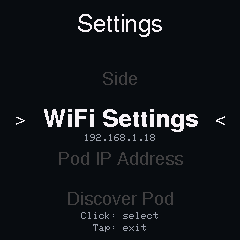
These nine screens were captured directly from the device. The recordings predate the newer manual-hold status line; current controls are documented above and in Controls and night mode.








Watch it work
Rotating the encoder moves the target and the arc settles when you stop. Silent recording captured from the device framebuffer.
Print a bedside enclosure
The project includes a base and faceplate for M5Stack Dial v1.1. Use the MakerWorld print profile or the repository’s 3MF files .
Source reference: Dial overview · Device capture workflow · Enclosure print instructions
Last updated on