Autopilot automations
Autopilot reacts to signals and conditions on the Pod. A recurring schedule answers “at what time?”; an automation also answers “under which conditions?” Both keep running when the browser closes.
Read a rule as a sentence
Think of a rule as: “When something happens, if these checks pass, then do this.” Choose the bed side as well: an action for Left should not change Right.
| Part | Plain-language meaning | Example |
|---|---|---|
| WHEN | When should the rule check? | The water-level reading changes. |
| IF | What must be true? | The new reading says the tank is low. |
| THEN | What should happen? | Record a notification that the tank is low. |
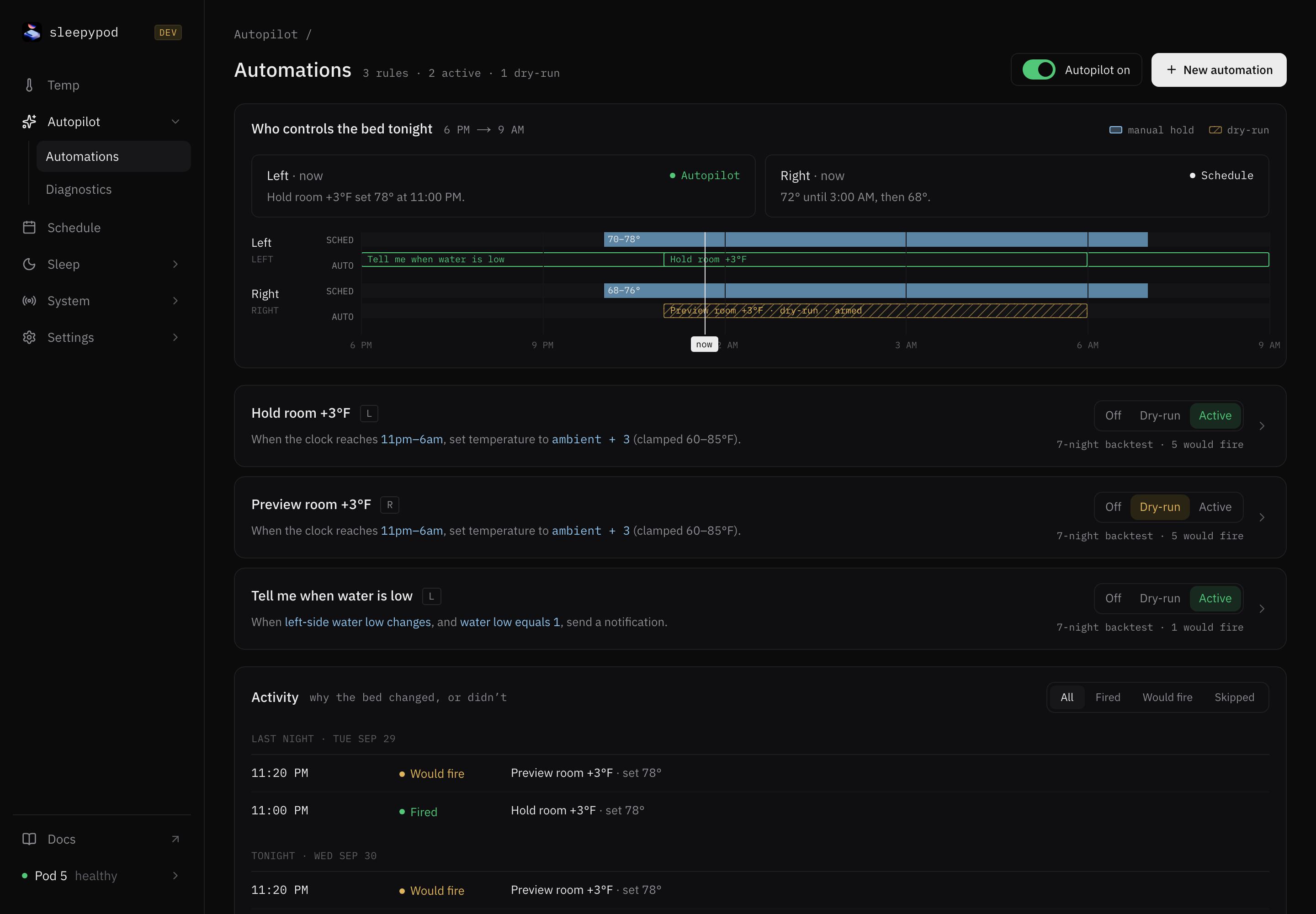
The Tell me when water is low template follows this pattern. A refill also changes the reading, but the IF check prevents a low-water notification when the tank is OK. In the referenced implementation, Notify writes to the core service log, with the action visible in rule activity; it does not send a phone push notification or email.
The engine checks on a roughly one-minute tick; a change trigger is not an instant hardware interrupt. A trigger starts a check; it is not proof that an action happened. A missing reading is unknown, not zero or “all clear.” The engine can combine conditions using ALL, ANY, and NOT. ALL requires every check to pass; ANY needs at least one. An unknown value stays unknown when inverted with NOT.
Two temperature examples
The templates are starting points. Check the actual signal availability in Autopilot → Diagnostics and try a dry run before relying on a rule. A signal appearing in the editor or a recorded-night backtest does not guarantee a fresh live reading.
Follow the room overnight
The Hold room +3°F template means: between 11 PM and 6 AM, request a bed target 3°F above room temperature, limited to the template’s 60–85°F range. These are example template values, not recommended temperatures for everyone.
This is a continuous policy: it keeps asking for a target while its conditions remain true. Leaving the time window or losing a required condition withdraws the policy. Another available temperature source can then take over.
Make a temporary adjustment
The Cool when restless template checks whether average movement over 10 minutes exceeds 200, then requests a target 2°F below the schedule/session baseline for 20 minutes. Its 30-minute cooldown spaces out new activations. The movement threshold is an example signal value, not a clinical definition of restlessness.
This is a one-shot: the target is calculated once. If the baseline is 76°F, the request is 74°F, subject to its configured limits. Repeated checks do not turn it into 72°F, then 70°F. Conditions becoming false do not cancel an already-active one-shot; its expiry, or disabling/editing the rule, ends it.
| Setting | What it controls |
|---|---|
| Temperature limits | The lowest and highest target the action may request. |
| Hold / revert time | How long a one-shot request remains eligible to control the side. |
| Cooldown | How long the rule waits before another activation; it is not the hold timer. |
| Priority | Which Autopilot request wins when several are active. Manual holds and run-once sessions still come first. |
“Revert” means choose whichever source applies now. It does not restore an old temperature or replay missed schedule points.
Build and inspect a rule
- Open Autopilot → Automations and create a rule or start from a template.
- Choose its side, trigger, conditions, and actions. Check temperature bounds, priority, and cooldown.
- Start with a notification or dry run to inspect what the rule would do.
- Review the rule’s run history and any backtest against a recorded night before enabling hardware actions.
- Use Autopilot → Diagnostics to inspect engine state and signals when results differ from expectations.
The rule model is WHEN / IF / THEN: a trigger, a condition tree, and one or more actions. Conditions can combine time windows, live signals, and historical aggregates. Missing signals are not evidence that a condition is true.
Backtest before you trust it
Every rule in the editor is replayed against real recorded history as you edit it. Pick one of the last five recorded nights and the backtest shows what the rule would have done that night, before it ever touches the bed. Nothing in the panel changes your Pod. It is a dry preview computed from the night’s stored signals.
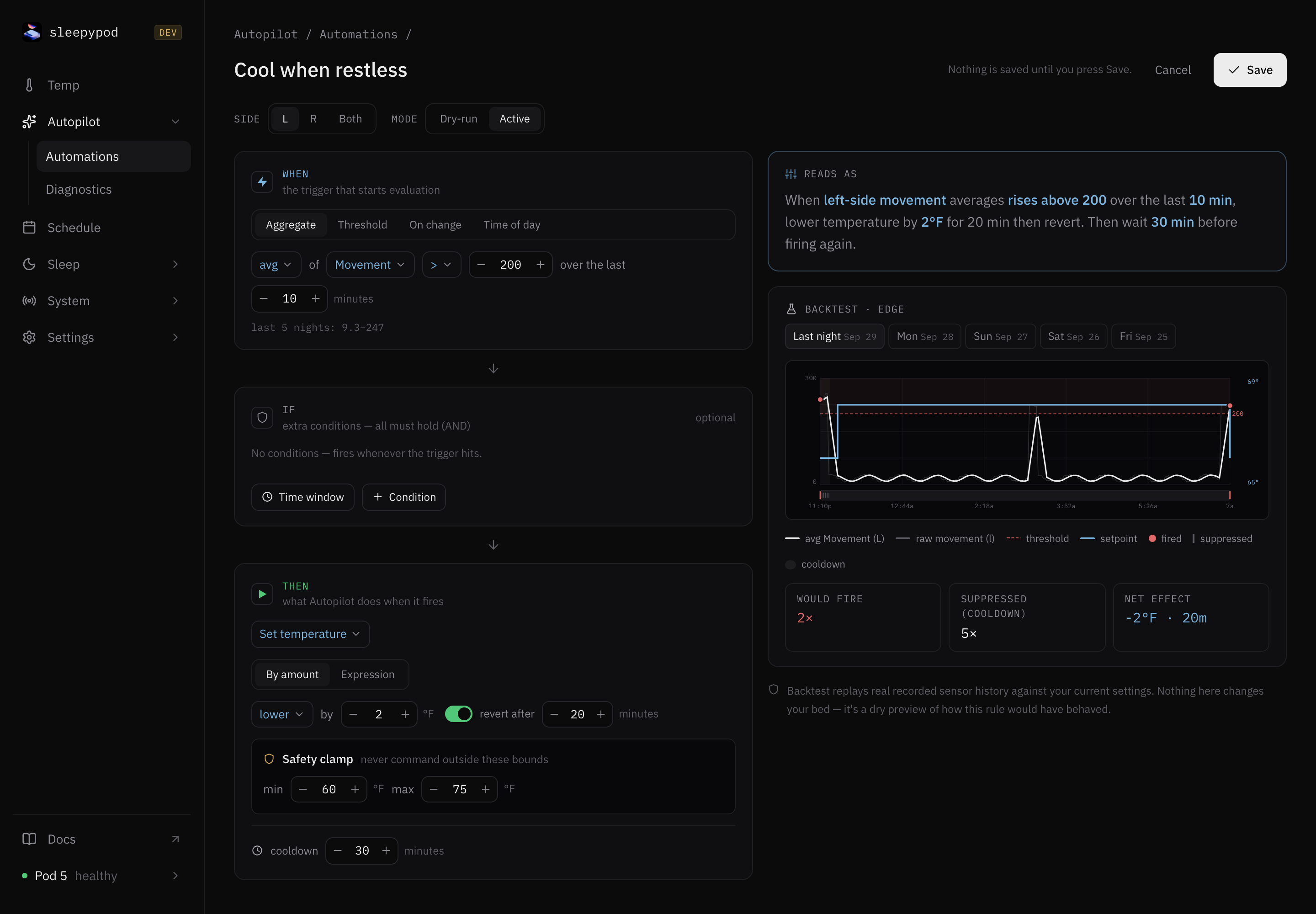
The chart has two modes, matching the two kinds of rule:
| Mode | When it applies | What you see |
|---|---|---|
| Edge | A threshold or windowed aggregate crossing fires a one-shot, such as Cool when restless. | The raw signal, its windowed average, the threshold, a red dot at each point the rule would fire, a tick where a fire was suppressed by cooldown, and the setpoint as a step line. The stats show would-fire count, suppressed count, and net effect. |
| Continuous | The setpoint tracks a live signal inside a time window, such as Hold room +3°F. | The tracked signal and the resulting setpoint on one temperature scale, the pre-clamp setpoint as a dashed ghost line, and the clamp band. The stats show clamp hits and the setpoint range. |
A few things the replay makes explicit:
- Cooldown is not the hold timer. In the capture above the rule fires twice and is suppressed five times. Each suppression is a tick where the conditions held but the 30-minute cooldown had not elapsed.
- Edge-mode setpoints are relative to a nominal baseline. Per-side target history is not stored, so the step line shows the action’s delta applied to the midpoint of the safety clamp, not the exact temperature the bed was at.
- The threshold range helps you aim. Under the trigger, the editor prints the compared value’s recorded range over the last five nights, so you do not set a threshold the signal never reaches.
- The list shows a five-night summary for every saved rule: how many times it would have fired, and for threshold rules the peak value against the threshold. Templates are marked live or backtest only depending on whether their signals are wired on your Pod.
If a side has no recorded nights yet, the panel says so instead of drawing a chart. Backtests replay the full recorded series, which can include signals that are not yet available live; check Autopilot → Diagnostics before relying on one.
Understand temperature behavior
Manual holds and run-once sessions outrank Autopilot. Among Autopilot requests, higher rule priority wins, then the newest activation. Recurring schedules supply the fallback.
A continuous policy owns a target while its conditions remain valid. False or unknown conditions withdraw it, and its lease expires if the engine stops refreshing it. A one-shot resolves its target once and holds it for 30 minutes by default; repeated engine ticks do not keep adding its delta or extending its lifetime.
Relative temperature actions use the schedule/session baseline, rather than their own previous output. Conditions still inspect live observations. This prevents a “lower by two degrees” expression from repeatedly lowering itself every tick.
Why did nothing change?
Read the activity reason before changing the rule. Outside its window, signal unavailable, cooling down, and another source owns the side explain different situations. A temperature request alone does not turn an off side back on. Turning power on is a separate action.
Stop or troubleshoot a rule
Disable the rule or use the global kill-switch to revoke its temperature requests. Editing or deleting a rule also revokes its old requests. Check the run log for fired, skipped, clamped, dry-run, and error outcomes. If another owner wins, inspect the manual hold and Resume controls.
Temperature clamping, cooldowns, action-rate limits, and pump protection still apply. A successful rule evaluation does not prove the hardware is circulating water; inspect System → Thermal for delivery evidence.
Source reference: Rule templates and builder · Engine and notification wiring · Autopilot design · Current ownership and request lifetimes · Autopilot interface