Sleep stages
Open Settings → Sleep stages and choose the sleeper using the section’s side tabs. This editor controls how Core classifies nights as Wake, Light, Deep, and REM. It is also available under Settings → Biometric calibration → Profiles.
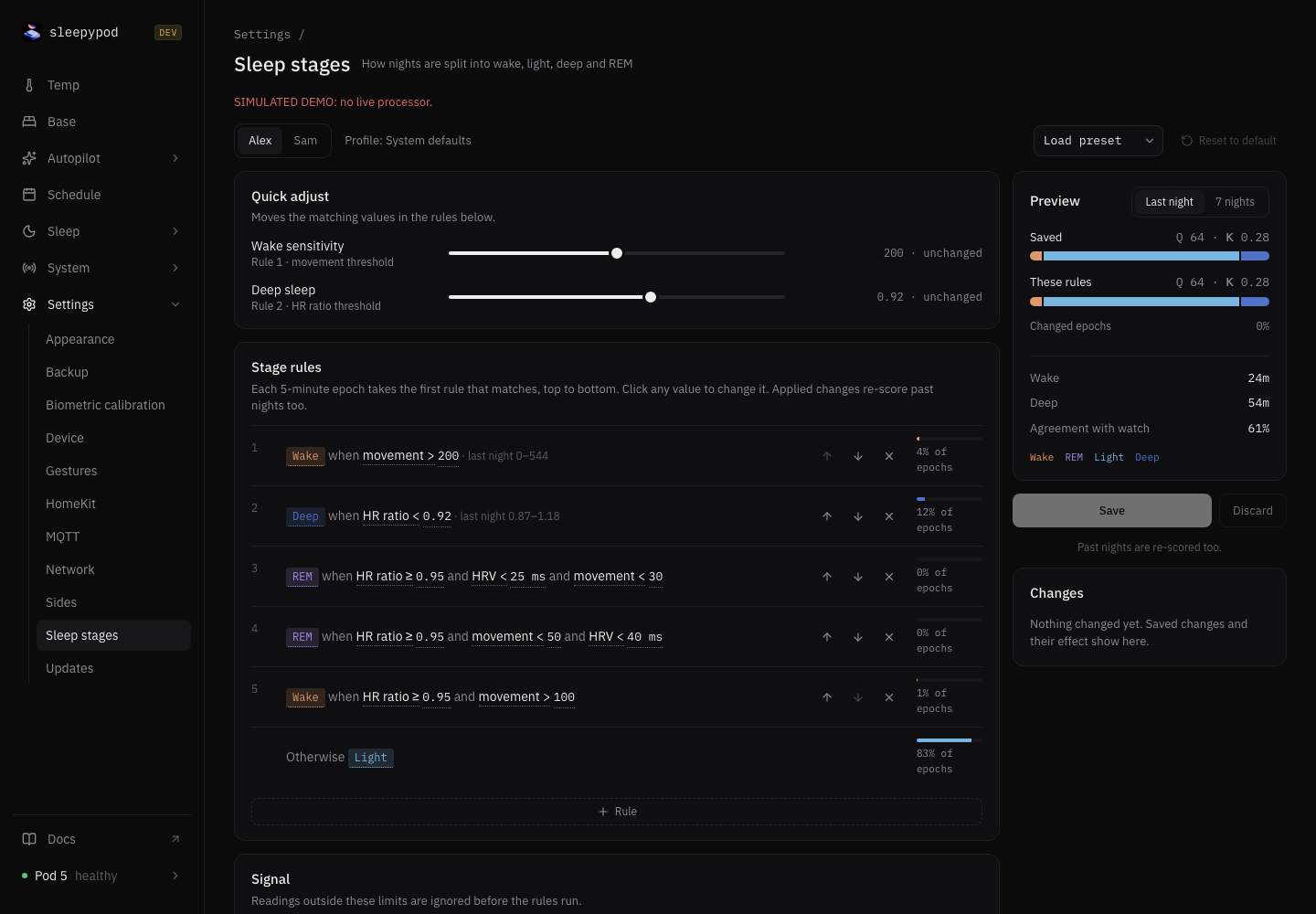
Read the rules
Each five-minute epoch takes the first matching rule, from top to bottom. Conditions use movement, heart-rate ratio, and HRV. Click a value to edit it; use the arrows to change rule order. Otherwise supplies the stage when no rule matches.
Load preset offers Default, Movement only, and HRV first. Presets are starting points. Quick adjust changes matching values in the rules below: Wake sensitivity adjusts the movement threshold, and Deep sleep adjusts the heart-rate ratio threshold.
Below the rules, Signal defines which readings are accepted. Low-quality calibration has a separate rule list. Cleanup smooths brief stage changes and controls disallowed transitions. Review these alongside the ordered rules when explaining an unexpected result.
Preview before saving
- Select the correct side and inspect the saved profile.
- Change a condition or load a preset. The draft stays local until you save.
- In Preview, choose Last night or 7 nights. Compare Saved with These rules, changed epochs, Wake and Deep minutes, and Watch agreement where reference data overlaps.
- Choose Save to request the change, or Discard to return to the saved rules.
Real Core demo: lower Wake sensitivity from 200 to 150, compare seven nights, then save and inspect Changes. The values and results are synthetic examples, not recommended settings or evidence of live processor adoption.
Watch agreement covers only overlapping reference data. No reference coverage means there is nothing to score. Consider Cohen’s kappa as well as percentage agreement: predicting the same stage everywhere can inflate raw accuracy. Pod and Watch HRV can use different definitions; check metric identity before comparing them. See Watch imports.
Saved versus applied
A saved change can remain pending until the processor adopts it. Displayed nights keep using the acknowledged rules while delivery is pending. Applied changes also re-score past nights; they do not rewrite the original sensor observations.
Changes records saved edits and their effects. Use Revert to restore a previous ruleset, or Reset to default to return to the default rules. Check processor acknowledgment after saving. If another save causes a conflict, reload the current rules before trying again.
For broader signal-processing profiles, retained datasets, and replay evidence, see Biometric calibration.
Connected agents
get_sleep_stage_rules inspects saved rules and reference coverage. preview_sleep_stage_rules compares a candidate without saving. To save exactly the previewed candidate, pass the returned candidateRuleset as ruleset to set_sleep_stage_rules; overrides are resolved again against the rules saved at save time. See MCP for agents.